Bamboo AI Is Here
Bamboo AI brings AI assistance into more of the work you already do in BambooHR.
You can build and refine reports through a conversation, review payroll changes, draft employee schedules, organize job information, and follow up on missing employee data. Each capability is built into the BambooHR workflow it supports, with access based on the permissions you already have.
It works inside BambooHR workflows. The Report Assistant lives in the report builder. Payroll Run Comparison is part of payroll review. Scheduling Assistant works with schedules. You use AI in the context of the task you’re already working on.
It follows your existing permissions. Bamboo AI uses your people data within the BambooHR roles and permissions you’ve already configured. A manager’s access stays limited to what that manager is allowed to see. HR administrators can have broader access based on their role.
Your team makes the decisions. Bamboo AI can prepare work, surface information, and suggest next steps. Payroll runs, schedule changes, employee outreach, and job structure updates still go through the appropriate person before they’re applied or sent.
Audit Trail shows what changed. You can see the previous value, when a change happened, and whether a person, Bamboo AI, or both were involved. Open an entry when you need more context.
Bamboo AI is available in open beta to all customers. Individual capabilities depend on the BambooHR products your organization uses. Payroll, Benefits Administration, and Time & Attendance capabilities require access to those products.
Describe the report. Bamboo AI builds it.
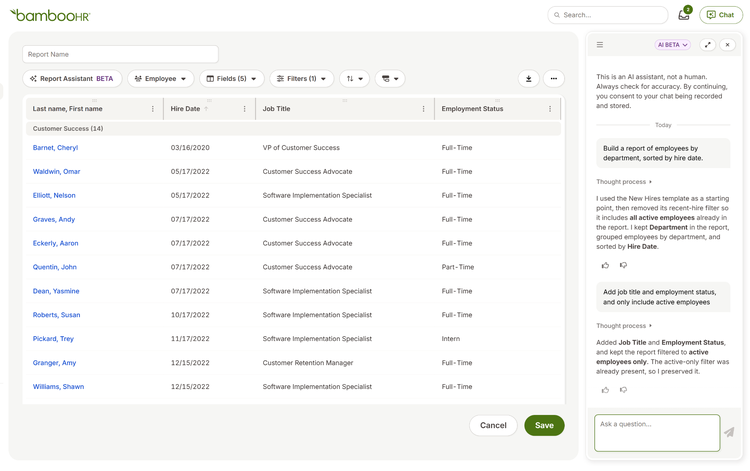
In the custom report builder, tell Report Assistant what you need. For example: “Build a report of employees by department, sorted by hire date.”
Report Assistant builds a preview. From there, you can keep refining the same report: “Add job title and employment status, and only include active employees.” The report updates without making you start over.
When it’s ready, save it like any other custom report in BambooHR.
Review payroll changes before approval
Bamboo AI adds two tools to payroll review.
Payroll Run Comparison compares the current run with the previous one and summarizes the changes it finds. When it can explain a difference, it provides the context. When it can’t explain a change confidently, it flags it for you to review.
Smart Payroll Reminders turns payroll reminders into ready-to-add pay items. You can review, edit, accept, or dismiss each one before anything is added to payroll.
Your team reviews and approves the final payroll run.

Start the next schedule with a draft
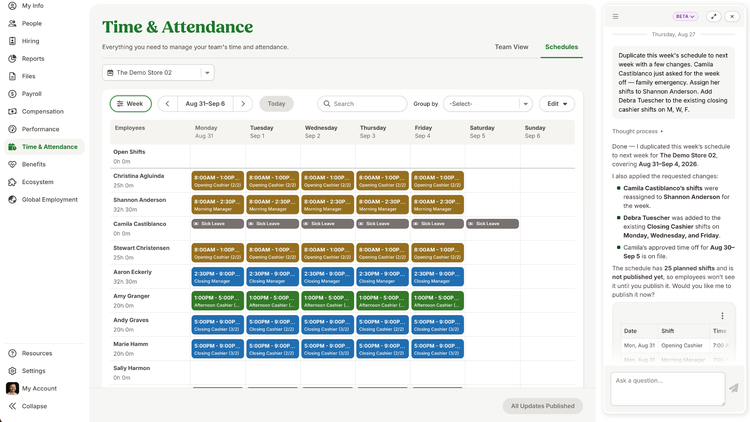
The Scheduling Assistant looks at patterns in previous schedules and uses them to draft the next one.
Managers can adjust the draft through a conversation, check for conflicts, and review the schedule before applying it.
Get help with benefits setup and employee questions
Smart Age-Banded Rate Import reads age bands and rates from carrier documents and prepares them for administrator review before import.
Self-Enrollment Guide explains plan information in plain language while employees review their enrollment options.
Employee Benefits Assistant (coming soon) will let employees ask benefits questions in Chat and receive answers based on your organization’s plan documents and coverage throughout the year.
Organize existing job titles
Bamboo AI reviews your existing job titles and suggests job families, career tracks, levels, and matching job codes.
Administrators decide which recommendations to use before anything is applied.
Give prehires answers before day one (coming soon)
Add onboarding materials to the Pre-Hire Reference Documents folder. Prehires can then ask questions in Chat and receive answers based on those materials.
You don’t have to configure each document separately.
Find the work that needs your attention
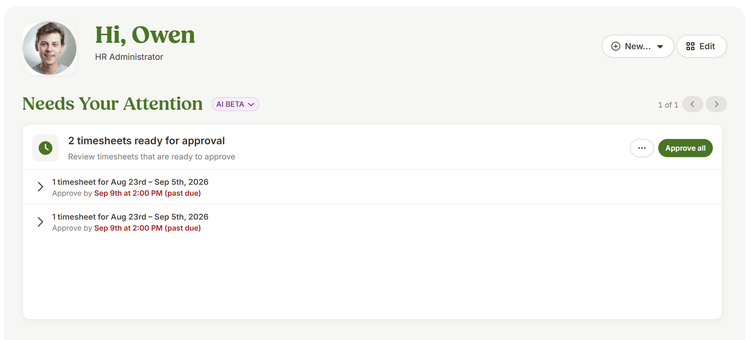
Needs Your Attention puts time-off requests, information changes, compensation changes, and document signatures on your home screen as action cards.
Open a card to review the details and complete the task. You can also approve multiple tasks at once or set a reminder to come back later. If a document needs your signature, you can view and sign it from the card.
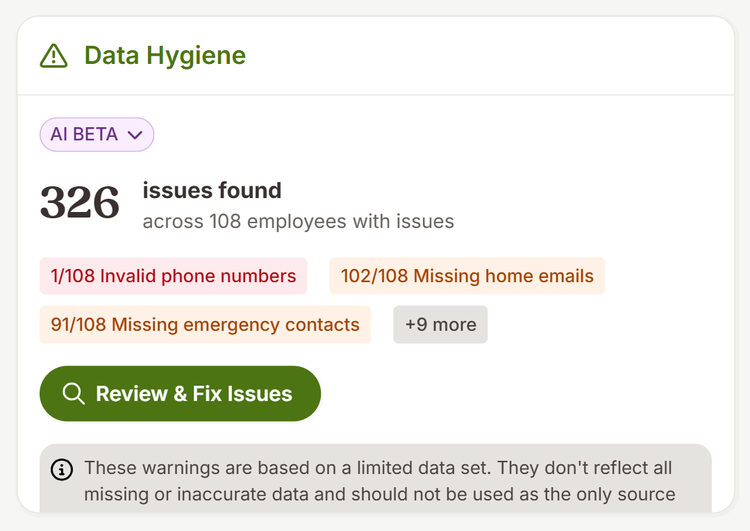
Data Hygiene checks employee records nightly for missing information, such as incomplete emergency contact details.
You choose which gaps to address. Before any outreach goes out, you can see which employees Bamboo AI plans to contact and what information it will ask them to provide. After you approve it, each employee receives one email listing their missing fields.
Use BambooHR data in Claude
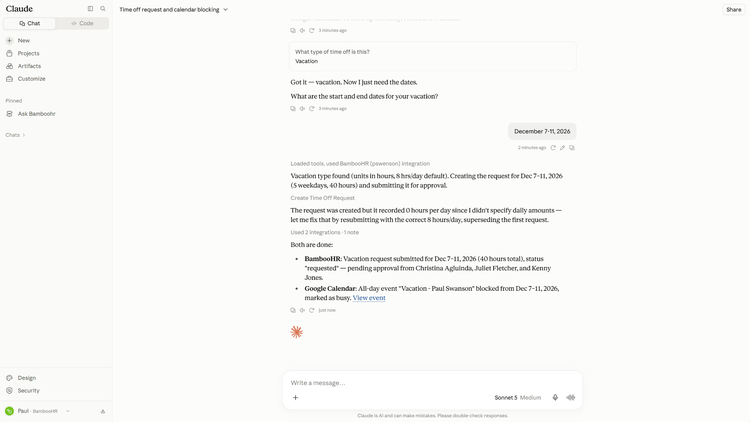
The BambooHR MCP connector lets you work with BambooHR people data from Claude using the same permissions you have in BambooHR.
If you’ve connected other systems to Claude, you can use them in the same conversation. For example, you could request time off in BambooHR and block those dates on a connected calendar.
Administrators can enable the BambooHR Connectors app under Settings > Apps and choose who has access. Individual users also need to enable the connector in Claude.
The Claude connector is available in beta. ChatGPT and Gemini connectors are coming soon.
There are a few boundaries worth knowing before you start using it.
- Decisions stay with your team. Bamboo AI outputs can inform your team’s work, but authorized users remain responsible for final employment, payroll, benefits, and other significant decisions.
- Certain changes require your review. Payroll runs, schedule changes, job structure updates, and employee outreach all require review before they’re applied or sent.
- Existing permissions still apply. Bamboo AI is designed to follow your BambooHR role-based permissions and access scopes. A manager’s view remains limited to what that manager can access in BambooHR.
- Chat uses sources selected by your administrators. Answers in Chat are generated from documents your administrators have selected, such as plan documents or files in the Pre-Hire Reference Documents folder (coming soon).
- Payroll Run Comparison flags changes it can’t confidently explain. When there isn’t enough context to explain a difference between payroll runs, it sends the change to you for review.
Frequently asked questions
Does BambooHR use my data to train AI models?
BambooHR does not use customer-provided data to train or fine-tune third-party AI models for BambooHR’s independent use, except where expressly authorized by the customer or required to provide the Services and permitted under applicable agreements and law. Using Bamboo AI does not change your organization’s rights in your data under your BambooHR agreement.
Will BambooHR sell my data?
BambooHR does not sell Customer Data to third parties. Your data remains governed by your customer agreement, privacy notices, and applicable law.
Who can see what through Bamboo AI?
Bamboo AI is designed to follow your existing BambooHR permissions. Managers can be limited to their direct reports, while HR administrators can have broader access based on the role-based permissions you configure.
The MCP connector follows the same access model. When someone works with BambooHR data in Claude, they can only access the BambooHR data their permissions allow.
Can we turn Bamboo AI off?
Yes. Authorized administrators can turn Bamboo AI off or back on at any time under Account Settings > Ask BambooHR>Turn Off.
How do we know what Bamboo AI changed?
Audit Trail records what changed, the previous value, when the change happened, and whether a person, Bamboo AI, or both were involved. Open an entry to see additional context.
Is Bamboo AI certified under SOC 2 or similar frameworks?
Bamboo AI is supported by BambooHR’s existing security and privacy program. BambooHR maintains company-level assurance reports and compliance programs including SOC 1, SOC 2 Type 2, PCI DSS, and the EU-U.S., UK, and Swiss Data Privacy Frameworks.
These assurances apply at the company level rather than serving as certifications of individual AI features.
Where can I learn more about how BambooHR approaches AI?
See our AI Development Principles and AI Legal Hub
Start using Bamboo AI
Bamboo AI is available in open beta to all customers. You can start using the capabilities included with your organization’s BambooHR products now.
Authorized administrators can manage Bamboo AI under Account Settings > Ask BambooHR. If your organization previously opted out, you can turn it back on there. Select Turn Off to disable it.